Advanced Designer
Manual + Auto workflow combined.
The most powerful workflow in Aura Pix Pro. Select photos, generate designs, review 650+ design possibilities, pick your preferred layout, and build your complete album — then open in Photoshop to finish.
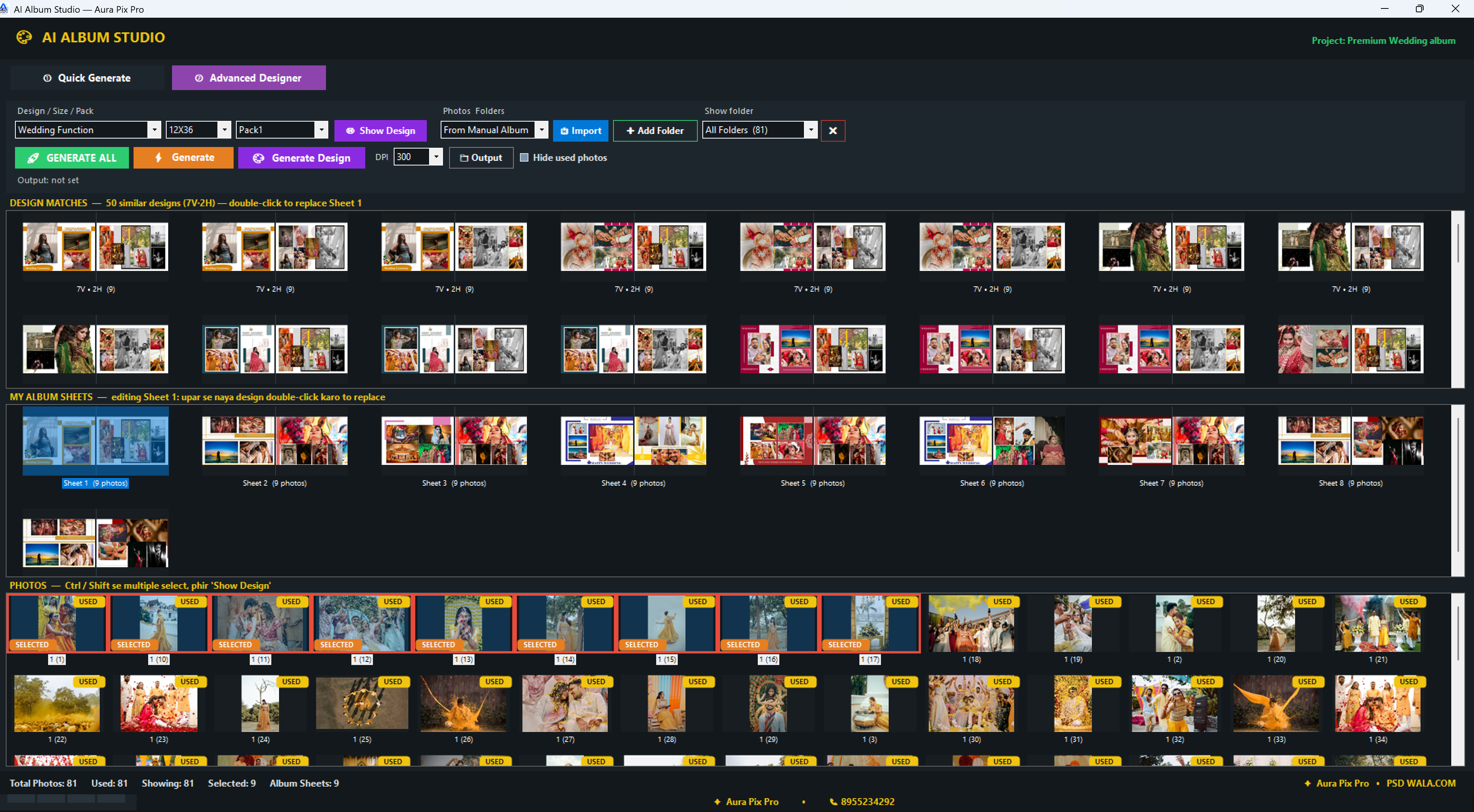
The Design Match Workflow
Select photos
Choose the photos for your current sheet.
Generate
Click generate and let the engine analyze.
Review matches
Browse through 650+ design possibilities.
Select
Pick your preferred layout for the spread.
Build album
Add to your album project sheet by sheet.
Edit in Photoshop
Open anytime for final manual tweaks.
Manual Precision + Auto Speed
The Advanced Designer bridges the gap between pure manual work and full automation. It gives you incredible variety with 650+ design possibilities for every sheet while keeping the ultimate choice in your hands.
Curate your album with confidence knowing every layout is a robust Photoshop document. Once selected, open it in Photoshop for those final localized adjustments that only an expert designer can provide.
Feature Highlights
- Generate 650+ design possibilities
- Review and select preferred designs
- Design Match for each sheet
- Build complete album sheet by sheet
- Open and edit in Photoshop
- Combined manual and auto workflow